How-To Guide
Turn a production one-liner into wall-ready 3″ squares — and a month calendar — that you can edit yourself.
Drop in your One Liner PDF and get clean, printable wall calendar squares. The part people miss: every card is fully editable — fix a scene, retype a set, hide fields, drag things into order, add or delete cards — all before you print. Here's the whole thing, and every step below has a live square you can actually play with.
1 Start with your one-liner
Drop your one-liner PDF on the home screen — it looks something like this. (No one-liner yet? Tap “build squares manually” and type them in by hand instead.)
| Sc# | I/E | Set | D/N | Pgs | Cast | Synopsis |
|---|---|---|---|---|---|---|
| THE SALTED ANCHOR | ||||||
| 12 | INT | THE SALTED ANCHOR - BAR | N | 1 2/8 | 1, 2, 5 | Mara corners Cormac over a whiskey; Old Silas eavesdrops. |
| 13 | INT | THE SALTED ANCHOR - BACK ROOM | N | 6/8 | 1, 3 | Jonah slips Mara the harbor ledger. |
| → MOVE TO PIER 7 | ||||||
| 14 | EXT | PIER 7 | N | 2 1/8 | 2, 4, 6 | Cormac & Sylvie find the skiff adrift, the engine still warm. |
| — END OF DAY 1 · Mon, Jul 6 · 4 1/8 pgs — | ||||||
…becomes editable wall calendar squares — in seconds.
Cast (fictional):1 Mara Voss2 Det. Cormac Reed3 Jonah Cade4 Sylvie Okaro5 Old Silas6 Harbormaster Greer
2 Tap any line to edit it
The thing people miss most: every line on a card is editable. On a phone tap it; on a computer click it — then type. Scene number, set name, cast, description — even an empty field.
The show name in the black bar isn't tapped directly — change it in the Show name box and every card's bar updates.
Try it → tap “THE SALTED ANCHOR - BAR” and rename it, or type a new Show name.
3 Grab ⠿ to rearrange
Every scene row and every location block has a ⠿ handle. Drag to reorder scenes, move a whole block, or pull a scene into a different day. A blue line shows where it'll land.
Try it → drag scene 14 from Day 1 into Day 2 — then drag it back.
4 Show only what you want
Hide anything you don't need on the wall — scene numbers, pages, day/night, cast, descriptions. Flip a toggle and the card updates instantly.
Try it → uncheck “Description”, then “Cast”.
5 Add scenes & days
+ add scene drops a blank row into a location; + add a day / square creates a whole new card. Then just type into the blanks.
Try it → add a scene, then add a new day.
6 Delete what you don't need
Remove a scene row, a whole location block, or an entire day with the ✕ — the row/block ✕ sits on the right, and a day's ✕ is in its top-right corner.
Try it → delete a scene with its ✕, then delete a whole day with the corner ✕.
7 Make it your own
Flip on ✎ Customize style above the cards to dress them up like a document. Pick a part of the card in the Editing menu (or All fields), then set the font, text color, highlight, bold / italic / underline, ALL CAPS and alignment — plus a card background. It's a familiar Google-Docs-style toolbar (it scrolls sideways on a phone), every change shows up live, and it carries through to the month calendar too.
Day 1 · Mon, Jul 6
Off by default, so the standard look is untouched until you want it. Your styling is saved on your device and survives a page refresh — no account, and nothing about your schedule ever leaves your device (only the look is remembered).
On the cards screen → flip on ✎ Customize style, choose Set name, and change its font & color.
8 Print it or share it
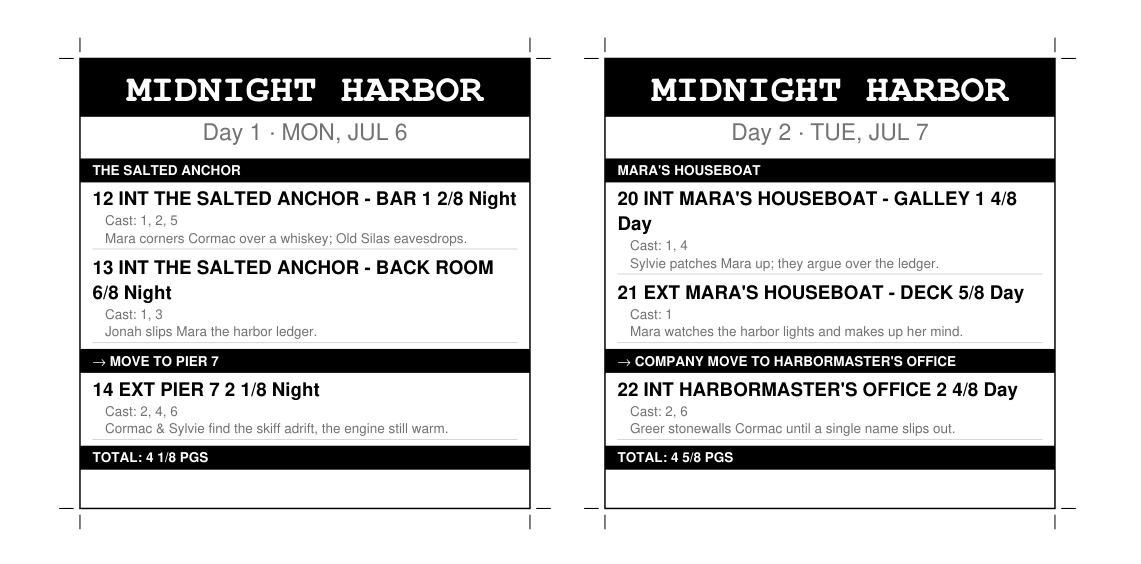
When it looks right, export two PDFs. First the 3″ wall calendar squares — trim lines included, ready to print and pin up:
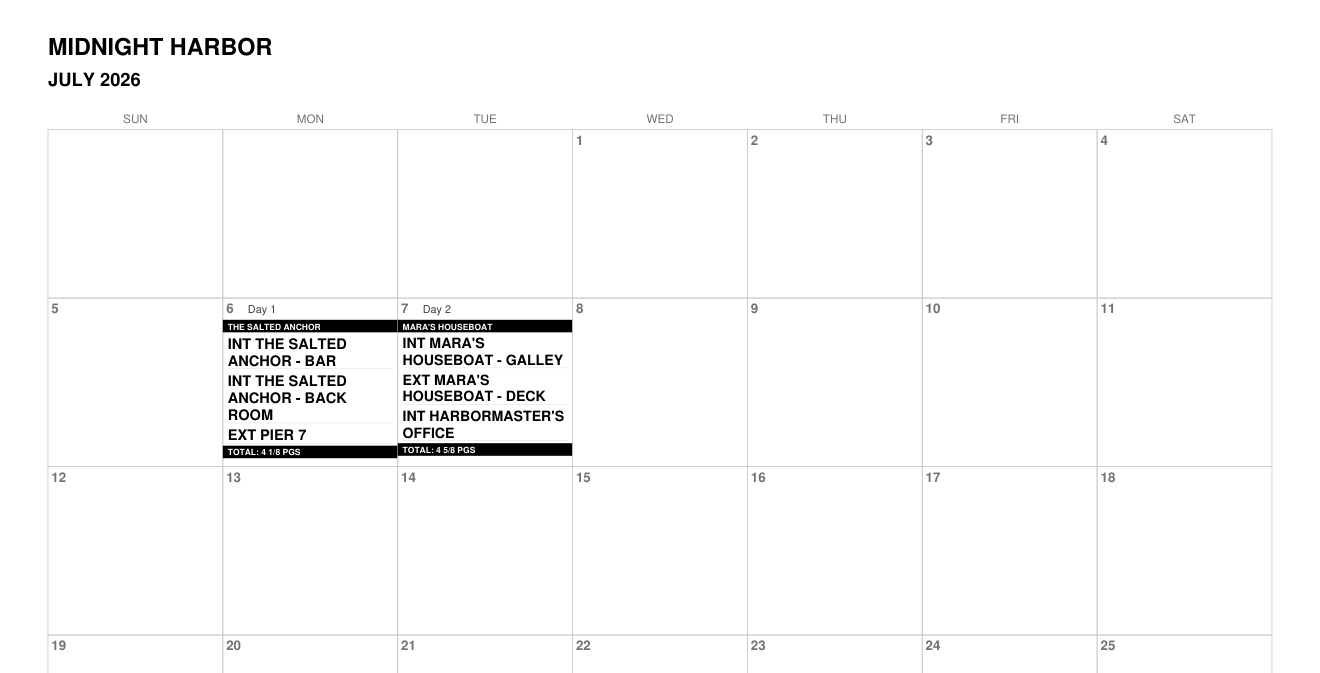
…and a month calendar that places each day for you:
Both are clean PDFs — print them, AirDrop them, or text them to the crew.
Edit it your way, then print the squares or share the PDFs.
← Back to Bity Buy One Liner